APACHE-2.0 · SELF-HOSTED OR MANAGED
One dock for
every database
you run.
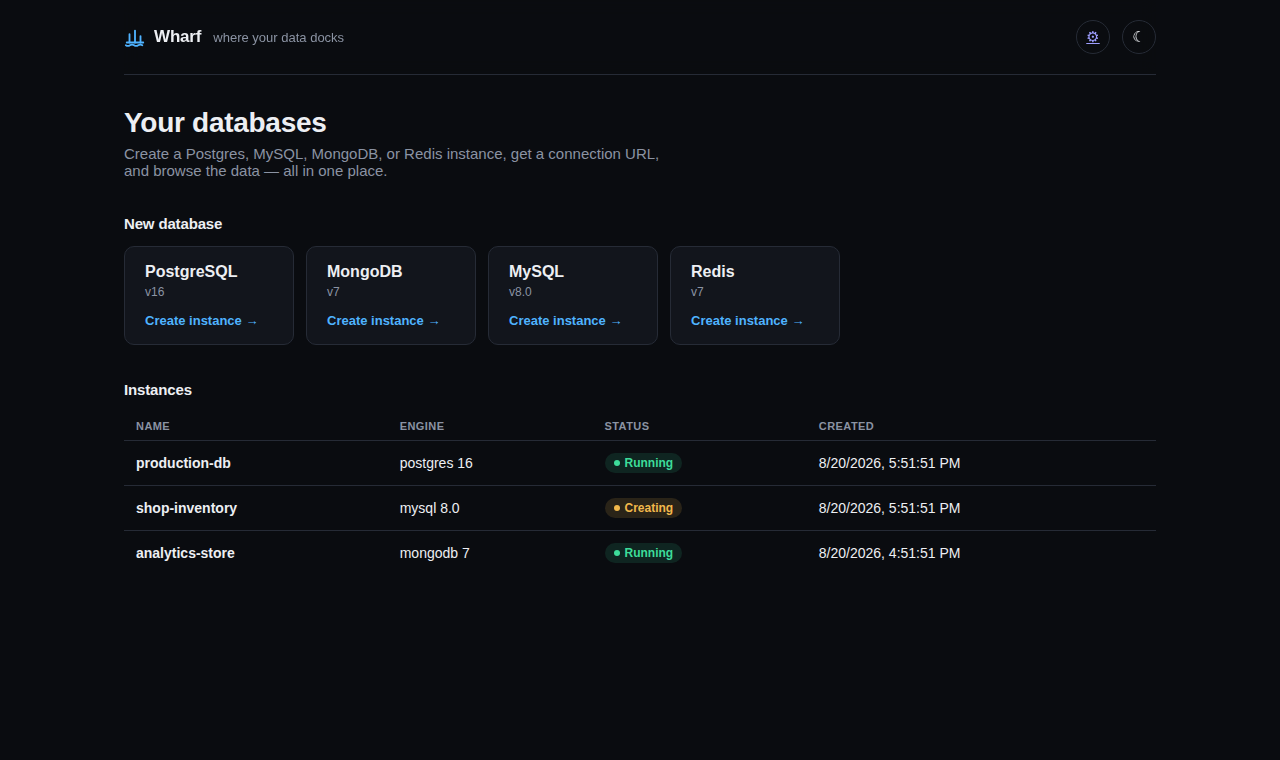
PostgreSQL, MongoDB, MySQL, Redis, and ClickHouse — provisioned from one control plane, handed back as a connection URL, and opened in a data browser worth using twice. No per-engine console to relearn.
- Engines
- 05 one manifest each
- Time to URL
- <30s no YAML
- Forked engines
- 00 official images
$ wharf create postgres
provisioning production-db (postgres 16)…
✓ running in 14s

DATABASE_URL=postgres://wharf:••••••••@host:55432/app

$ wharf url production-db --browse
opening data browser …
THE PROBLEM
Every engine ships its own console. Nothing ships the whole shelf.
RDS for Postgres, Atlas for Mongo, a different dashboard for Redis — each fine on its own, each a different login, a different way to look at a row. That's a tax on anyone who just needs a database to exist, with somewhere decent to look at it.
Without a dock
- A separate vendor console per engine, each with its own auth and its own idea of a good UI
- Credentials stitched together by hand, copied into five different
.envfiles - "Look at my data" means a client you install, or a admin panel bolted on as an afterthought
- Self-hosting means giving up the nice parts of the managed tool entirely
With Wharf
- One control plane, one CLI, one UI — the engine is a dropdown, not a decision about tooling
- A connection URL and a
.envline, generated and ready to paste, every time - A data browser that's the actual product, not a bolted-on Adminer link
- Self-host the exact same OSS core the managed version runs — nothing held back
SUPPORTED ENGINES
Depth on five engines, not a shallow coat of paint on fifty.
Each engine is one versioned service manifest — image, health check, backup strategy, connection template, data-browser adapter. Adding an engine is a pull request, not a rewrite of the control plane.
$where, no eval, so browsing can't become remote code execution.DUMP/RESTORE backups — the one engine with no clean stdin dump path.FORMAT JSONEachRow data for backup and restore.WHAT'S ON THE MANIFEST
Production-grade by default, not an opt-in tier.
Every reference below is a real path or action code in the control plane — not marketing copy. Backups, resize, branching, tokens, and alerting all shipped with a real end-to-end test against a real container before they were called done.
A data browser worth opening twice
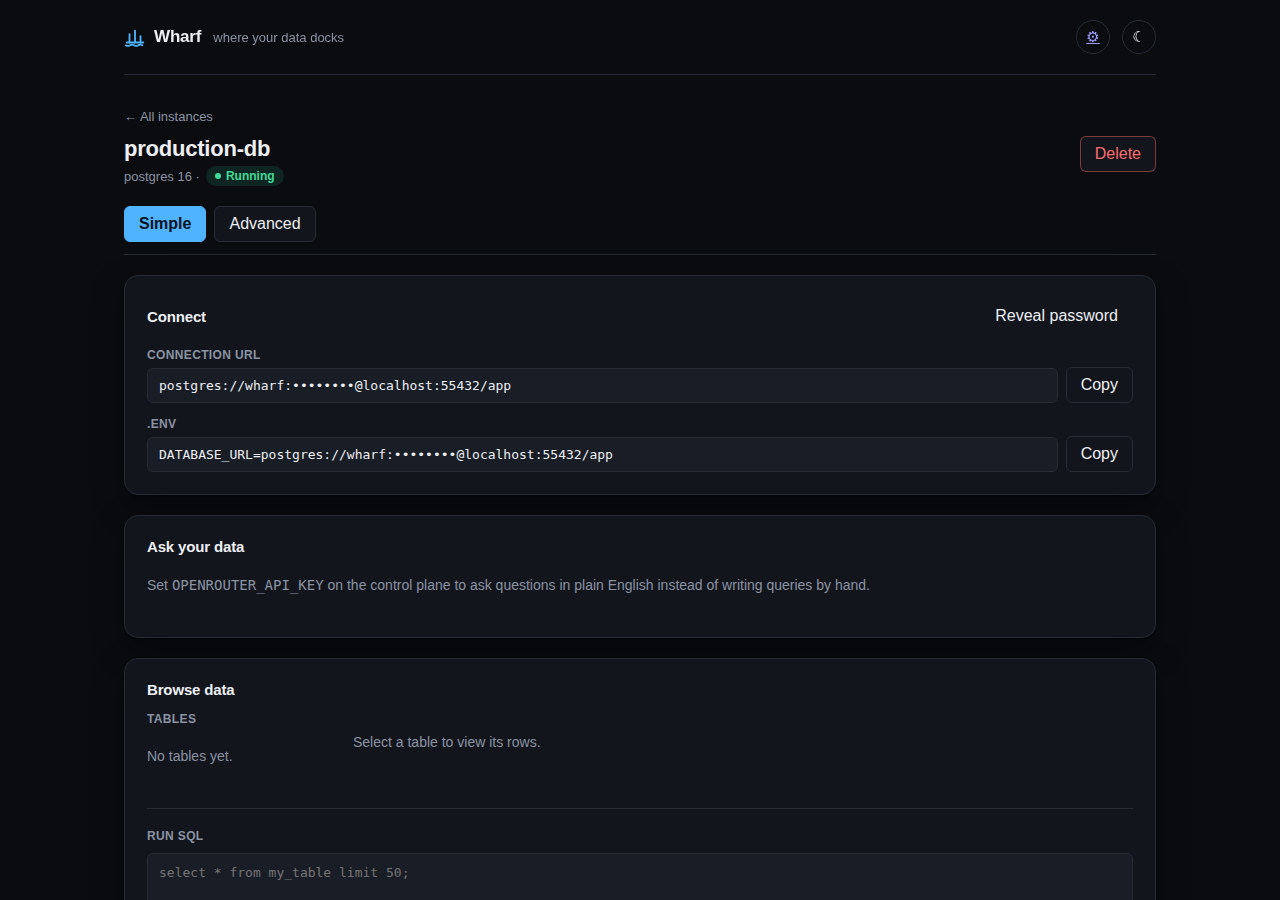
Table and collection browsing with pagination, a real query runner, and a plain-English "ask your data" box for anyone who'd rather not write SQL by hand.
Live resize, no restart
Grow or shrink CPU and memory on a running instance — applied to the live container's cgroup limits, capped by an aggregate host-wide budget so no combination of instances can overcommit the box.
Backups on a schedule, not a reminder
Set an interval and a retention count once; the oldest backups prune themselves automatically. One click restores any of them back onto the instance.
Branch a database like a git repo
Dumps the source and restores it into a fresh instance in one call. Mutate the branch, and the source — a real, independent copy, never a proxy — doesn't see it.
Hand out a key, not your whole login
Scoped API tokens bound to exactly one instance, read-only or read-write — safe to drop into a script or a CI job without handing over the account behind it.
A REST API your tables didn't know they had
GET/POST/PATCH/DELETE /instances/:id/api/:table, generated on request against a validated table allowlist — no code to write, no ORM to configure.
CSV and JSON in, one drop
Drop a file on an existing table or collection and it's parsed and inserted — the same importer the CLI and the UI both call.
Know who touched what, and when
Every mutating action — delete, resize, restore, a token minted or revoked — recorded against the instance, outliving the instance itself if it's later removed.
Alerts before the pager does
Resource thresholds and slow queries pushed to a webhook you control, with a per-instance cooldown so one hot instance doesn't flood the channel.
+ seed data, framework snippetsEvery fresh instance starts with sample rows already in it, and the Connect panel hands back ready-to-paste code for the framework you're actually using — not just a bare connection string.
ONE INSTANCE, TWO VIEWS
Adapts to whoever's looking — not two products.
The default view hides everything except connect and browse. One click away, the same instance shows raw config, live metrics, logs, and a shell. Nothing is duplicated, nothing is a paid unlock.
HOW THIS IS VERIFIED
Tested against real containers, not mocked ones.
Every engine, every feature above, has an end-to-end test that talks to a real running container in CI — the same discipline that has caught real bugs (a readiness race, a foreign-key leak, a branch that silently restored nothing) before they reached anyone self-hosting this.
SELF-HOST IN ONE COMMAND
Zero to a running database in under five minutes.
Requires Docker and Docker Compose. Runs on your own laptop, a spare box, or a VPS — same OSS core either way, nothing held back for a hosted tier.
Read the full quickstart →cd deploy && docker compose up --build